Control 360 is the complete system that shows you everything that matters in your company: people, hours, jobs, materials, machines and money. On the spot, with proof. Not hearsay.
Four sites. 30 people. A phone that never stops ringing. Sound familiar?
07:30
You stop by the first site. You count five people. The notebook says eight.
The other three are on their way.
They went for materials.
They’ll be right back.
One man “on his way” two hours a day: 42 hours a month. Paid. Not worked.
09:15
The Otopeni crew is standing idle. The grinder is “with Radu”. Radu is in Snagov.
He took it the day before yesterday.
I thought he’d brought it back.
Shall we buy another one?
Four people paid to wait for one tool. Then you buy another grinder.
17:00
Your best worker comes to see you. He’s upset.
I stayed till 6.
The foreman put down 4.
Why are you cutting my hours?
Pay too much and you lose money. Cut too much and you lose the man.
Sunday · 21:00
You close the month. Notebooks, wonky photos on WhatsApp, a spreadsheet.
I need the hours by 9 on Monday.
Your weekend goes on other people’s timesheets. Every month.
00:40
You can’t sleep.
Did we make anything on this job?
Who was actually on site today?
What if the labour inspectors turn up tomorrow?
The whole company fits in your head. And nothing else does.
You don’t measure a wall by eye. Don’t run your company by eye.
02
What you can’t prove, you pay for.
How much? Put in your own numbers.
5,670 RONa month (21 working days), paid for hours you can’t prove.
Control 360 Operations, for 30 people: 1,470 RON a month, plus VAT.
03
You can’t be on every site. You can see every site.
55 modules. Everything you keep today in a notebook, in Excel and on WhatsApp, in one place. We start with one job, not with everything.
Automatic clock-in · in the Start plan
See who is on sitewithout calling anyone.
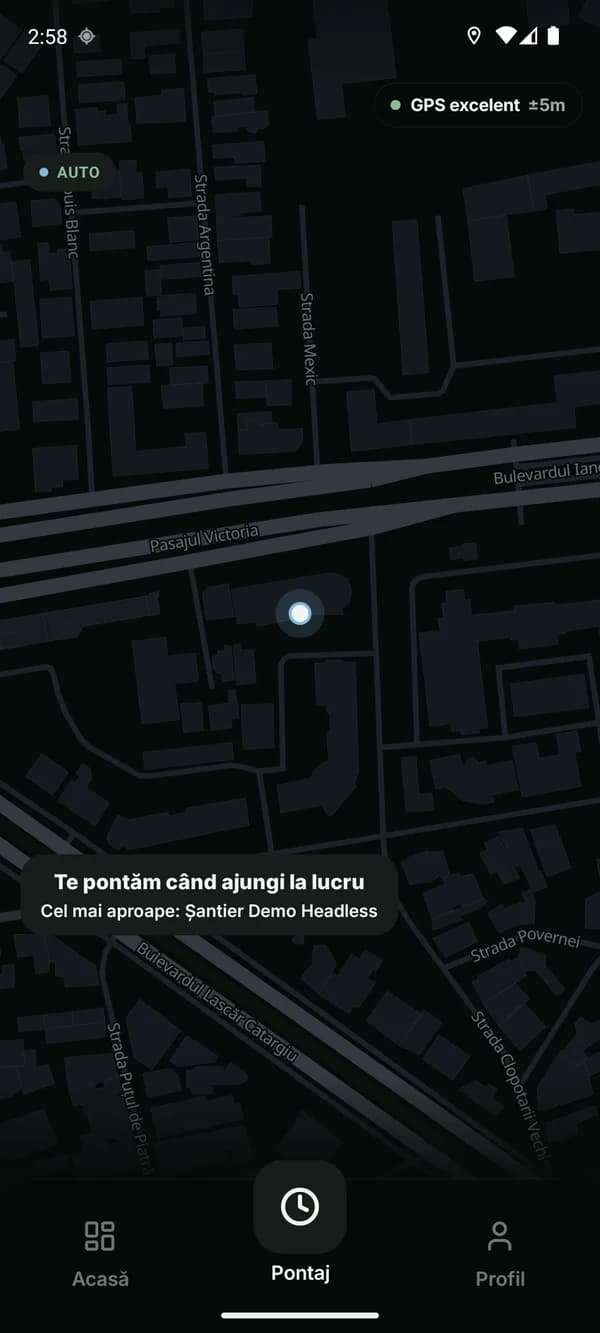
A worker walks onto the site and their phone clocks them in. They walk out, and it clocks them out. No more collecting sheets, no more asking for photos on WhatsApp, no more haggling over hours on payday.*
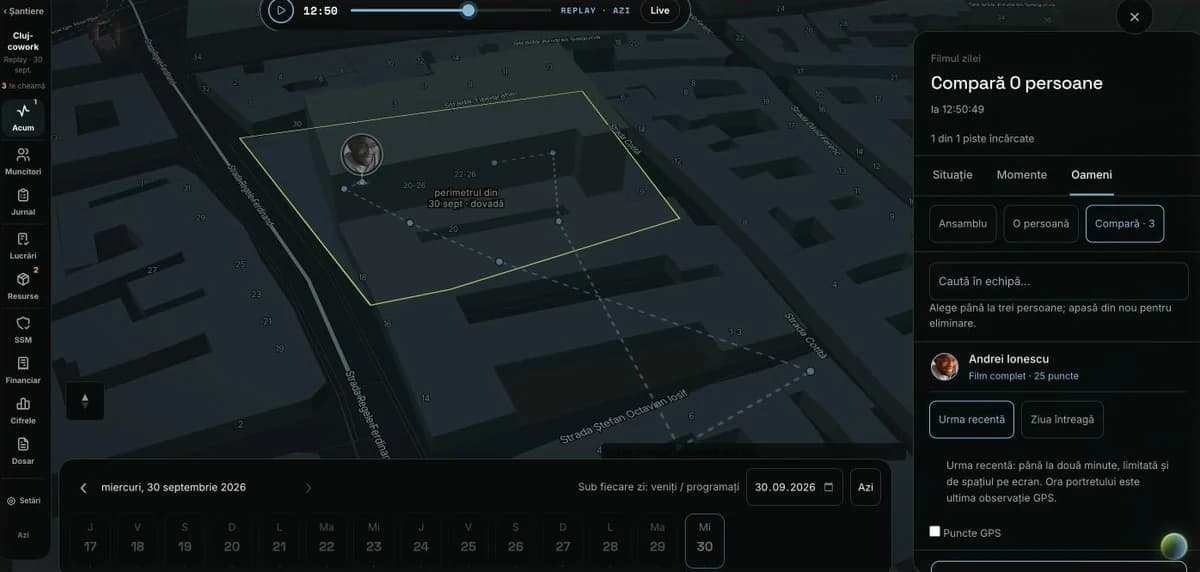
Anyone’s day, replayed on the map
1Clocks in by itself at the gateThe worker walks onto the site and is clocked in. Walks out, clocked out. On phones set up at the start, nothing to press.
The outline of the site is drawn once on the map. The worker’s phone knows by itself when they arrive and leave, only on their own jobs, and senses whether they walk, drive or stand still, so it clocks in at the right moment.
2Works from the pocketThe worker doesn’t open the app: clock-in works with the phone in the pocket, screen off.
even after the phone is restarted
you see which phone isn’t set up
the repair steps, sent to the worker by SMS
3Works without signalIn a basement or a field, the record waits on the phone and leaves by itself when the signal is back.
4An hour is an hourA clock turned back, a fake location or a phone left lying still don’t pass as a day worked. You see them before payroll.
a clock turned back doesn’t move the time of the record
a fake location is caught and can’t take anyone out of their shift
where the phone isn’t sure where the person is, it doesn’t guess: it sets the day aside for you to clear up
a phone left still for 30 minutes shows on the map
on two sites side by side, the worker stays on their own job
5No phone? Still clocked inThe site manager or the office enters them, with a reason.
On a phone that doesn’t clock in by itself, the worker clocks in with a button. A tablet can also stand at the site gate; that part is in pilot.
6Anyone’s day, replayed on the mapWhen they arrived, how long they stayed, when they left. On the map, hour by hour.
The month’s hours and leave
You approve the month; your accountant gets it ready, without notebooks.
1The month’s timesheethappens by itselfThe month adds itself up from clock-ins; you only approve the exceptions.
days without problems, approved together
only the exceptions reach you
you close the month once
after closing, nobody touches the figures
Forgotten exits, days with weak signal and disputes stay in review. When you close the month, the figures freeze; reopening needs a reason and stays on record.
In the plan Start
2Proof of every dayhappens by itselfFor each worker: when they came, when they left, which site they were on.
the time they came and left
which site they were on, and for how long
the day replayed on the map
In the plan Start
3Disputes“I stayed till 6”? His day on the map shows you whether it’s true.
the dispute, from the worker’s phone
the decision, with the day’s proof
corrections, with a reason
every change stays on record
In the plan Start
4Overtimehappens by itselfHours beyond the schedule add up by themselves, for each worker.
hours beyond the schedule, day by day, per worker
night and holiday hours, apart
Labour Code: an overtime hour is given back as paid time off within 90 days; otherwise it’s paid with a bonus of at least 75%. You have each worker’s hours in time, so the choice is yours.
In the plan Operations · Labour Code
5Leave and absencesThe worker asks from the phone, you approve, the days left go down by themselves.
annual leave, with the days left
sick leave
childcare leave
unpaid leave
unexcused absences
the leave list: who’s away and when
In the plan Start
6The month for your accountantYour accountant gets the month ready, by personal ID number, without calling anyone.
approved hours only
overtime, night and holiday hours, apart
your accountant prepares the month, you approve it
In the plan Start · Excel
Your sites today
What happens on each site, without a phone call.
1Morning reporthappens by itselfEvery morning, one summary: where people are missing and what’s stuck.
who didn’t come
clock-ins left open
a site started without its site manager
a site short of people, and what it costs you
tasks blocked for over a week
We switch it on for your company, in the app and by e-mail.
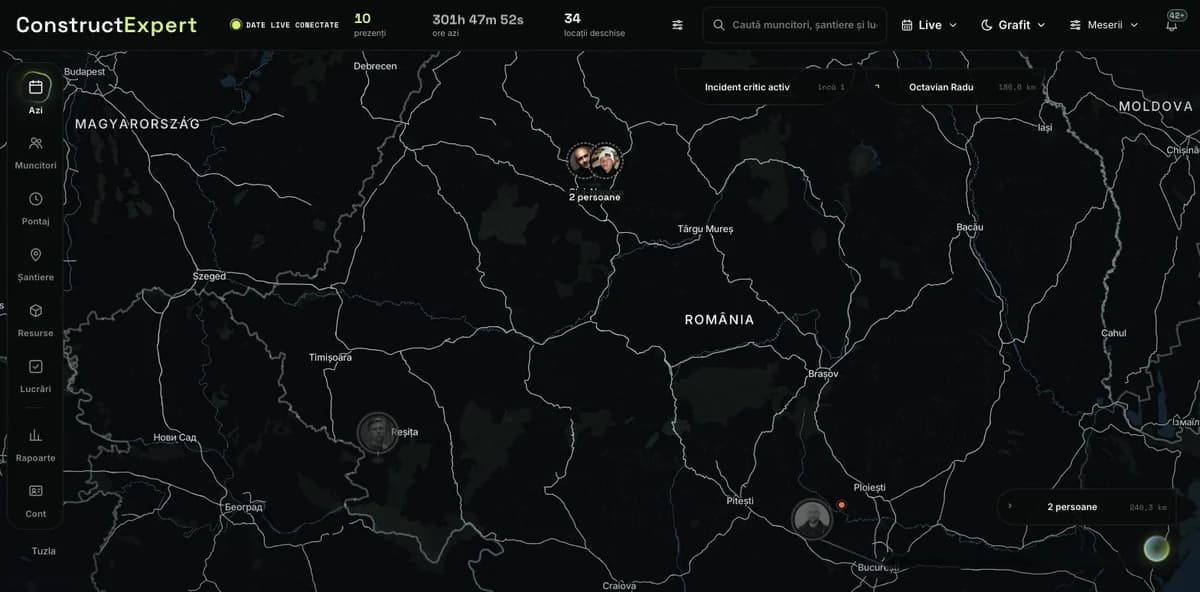
2Today’s maphappens by itselfAll your sites on one screen: who is where, who is missing.
all your jobs, with their teams
who is missing against the schedule
a site manager sees only his own sites
pay rates, only for the owner, manager and accountant
In the plan Start
3The teams’ tasksEach team knows what to do; you see what got done.
deadline and priority
urgent ones reach the worker’s phone
repeating tasks, from a template
started, paused, done from the phone, even without signal
In the plan Operations
4The site manager’s checkA task closes only when the site manager has checked it.
the steps to check
accepted or redone, with a reason
In the plan Operations
5Problems and blockersWhat stops the work reaches whoever can fix it.
the problem with its place, from the phone
who answers for it and by when
which task it holds up
In the plan Operations
6SubcontractorspartialWhat you gave to another firm, with the agreed price on each task.
firms, with company ID and trade
which tasks they got
the agreed price, per task
In the plan Operations
The estimate and the margin
The estimate price next to what it cost you, month by month.
1The margin on every jobpartialMonth by month you see whether the job is making money, chapter by chapter, not only at the end.
what you executed against what it cost you
split by chapter, following the estimate
you see which chapter works at a loss
In the plan Business
2What each job costpartialLabour, materials and machines add up on the job, in RON.
the cost of your people, day by day, from approved clock-ins
materials, at the price on the goods note
machine hours
the subcontractor’s price
In the plan Business
3The tender estimatePrices from your past estimates, the recap done by itself. A private client sees the final price, not your profit.
chapters and items
materials, labour, machines, transport
CAM, overheads, profit, VAT
In the plan Business
4Your estimate, brought inNo retyping: bring it in from the Excel file exported by ISDP, WinDoc, eDevize or WindevRO.
from Excel or CSV
the header row, recognised by itself
In the plan Business
5Monthly valuationsThe monthly valuation is made from what was executed, not from memory.
contracted, previous, current, cumulative
the advance recovered on each valuation
the client’s or supervisor’s approval, from paper
tells you which valuations are due
In the plan Business
6The month’s budgetpartialEach site’s budget, next to what has already been spent.
budget per site and per month
approved by a second person
closing the month, for the accounts
In the plan Business
Your clients
You have something to show: the approved valuation, the signed diary, the quantities with photos.
1The client’s pagein pilotThe client sees their job: estimate, valuations, invoices and papers. Not your people’s location and none of your costs.
the estimate, accepted online
valuations and invoices
the job’s papers
messages per job
In the plan Business
2Extra workWhat goes beyond the estimate is written down before you do it, not argued about after.
variation order for extra work
omission order
what goes beyond the estimate isn’t invoiced without agreement
In the plan Business
3Site diaryDay by day, with the hours from the clock-ins; at handover you have every day signed.
the day’s hours, filled in by themselves
the day’s notes
the day signed
corrections kept
the day as a PDF, to send to the client
In the plan Operations
4Executed quantitiesWhat was executed on each estimate item, with photos.
quantity per item, per day
a note and photos
the basis of the monthly valuation
In the plan Business
5Day-workThe labour sheet comes out of the clock-ins, ready to show the client.
a monthly sheet, by people and hours
In the plan Business
6Every client on one pageWhat’s waiting on you and what’s waiting on them, for each client.
estimates, valuations and labour sheets, with where they stand
what’s approved and not yet invoiced
their jobs, site by site
In the plan Business
Invoices and payments
Invoices, payments and retentions, up to date, without asking your accountant.
1Payments and due datesWhat you have to pay this week and what’s overdue.
due today and in the next 7 days
overdue
invoices waiting for approval
In the plan Business
2The invoice from the valuationin pilotThe invoice comes from the approved valuation and goes to e-Factura.
exactly the approved amount, by chapter
the client checked at ANAF
a full credit note or a cancellation, approved by a second person
The invoice goes out through your company’s Oblio account; we set it up with you.
In the plan Business · e-Factura
3Performance retentionhappens by itselfin pilotThe retention from each valuation is followed until you collect it.
kept by itself on each valuation invoice
retentions to collect, per job
the release matched to the bank statement
In the plan Business
4Suppliers’ invoicesYou never pay the same invoice twice, or one nobody approved.
tied to the order or the goods note
approved by a second person
duplicates, stopped by themselves
In the plan Business
5The bank statementPayments on the statement are tied to invoices, line by line.
the statement, downloaded from your bank as CSV
each payment tied to its invoice
In the plan Business
6Expense claimsMoney given to people for the site, with a receipt and an approval.
the receipt attached
approved by a second person
taken off the advance
booked to the job
In the plan Business
Health and safety, inspection
The register, the trainings and the protective gear, ready before the inspection.
1Attendance registerhappens by itselfInspection tomorrow? The register is already done, from the clock-ins.
by day: who, where, at what time
the collective sheet, monthly
in PDF and Excel
nothing handwritten
In the plan Start · ITM
2Labour law, checked every weekhappens by itselfIt tells you who went past 48 hours, who had no day off and who works without a contract.
over 48 hours a week
no day off in the week
night work
public holiday hours, apart
a worker without a contract
which site must be declared to the labour inspectorate
In the plan Operations
3Safety trainingsYou know whose training is up to date, whose runs out and how many days were worked without it.
induction
on the job
periodic and additional
for several people at once
tells you before it runs out
In the plan Operations
4Protective gearYou know who got a helmet, a vest and a harness, and until when they’re good.
what each worker received
who gave it and when
the expiry date
what each job requires
In the plan Operations · PPE
5Safety on siteYou see who works on site without training or without gear.
each job’s risks
who isn’t ready
incidents, from report to closing
In the plan Operations
6Papers and permitsEach job’s permits and approvals with their deadlines, on a calendar.
permits and approvals per job
versions and expiry dates
the deadlines calendar
Materials
Every bag, from the supplier to the job.
1Stock in the warehouse and on every sitehappens by itselfYou know what’s in the warehouse, on each site and on the road.
the company warehouse
each site’s stock
goods on the road
an alert below the minimum
planned against used, per site
In the plan Operations
2Materials requestsThe crew asks from the phone; you see where the request has got to.
the request, from the phone
sent, approved, prepared, delivered
the material booked to its job
In the plan Operations
3Quotes and ordersYou compare suppliers’ quotes; the chosen one becomes the order.
suppliers’ quotes, on the same quantities
the order, from the chosen quote
In the plan Operations
4Goods in, with a goods notehappens by itselfWhat comes from the supplier enters the stock with a goods note, checked against the order.
the goods note in your series
differences found at delivery
goods beyond the order, stopped
In the plan Operations · NIR
5Delivery and issue noteshappens by itselfDelivery notes and issue notes make themselves, numbered.
transfer warehouse ↔ site
the delivery note, issued by itself
the issue note, issued by itself
returns, with a return note
In the plan Operations
6StocktakeThe stocktake is counted per location; differences come out by themselves.
stocktake per location
the count sheet
materials and tools given to a worker
a loss only with a reason
night-time moves, flagged
In the plan Operations
Machines and tools
Every machine: where it is, who has it, what it costs.
1Handing overYou know who has the grinder: the giver and the taker both confirm on their phones.
who answers for the machine
confirmed on both phones
the handover record, made by itself
each tool’s history
In the plan Operations · Handover record
2Inspection, insurance, servicinghappens by itselfYou hear about inspections, insurance and servicing in time, not at a check.
roadworthiness test (ITP), insurance (RCA) and ISCIR, on every machine
servicing, on its due date
a reminder 30 and 7 days before
a warning if you send it to a site with papers expired
In the plan Operations · ITP · RCA · ISCIR
3Where each machine isYou see on the map which site each machine works on and who has it.
which site it’s on
who has it now
with a return date
a late return, flagged
In the plan Operations
4Hours and dieselEach machine’s hours and litres, per job.
hours per day
litres of diesel
entered from the phone
In the plan Operations
5Defects and repairsWhat broke, where it was repaired and what it cost.
the defect, reported from the field
the machine check, from the phone
the repair, with its cost
In the plan Operations
6Your machinesEach machine with its serial, plate and rate.
serial and registration number
rate per hour or per day
owned or hired
retired and scrapped
In the plan Operations
People and the assistant
Your people, their papers and, in pilot, an assistant that answers from your company’s data.
1The AI assistantin pilotYou ask “Who was missing on Tuesday at Pipera?” and it answers from the clock-ins, with the source.
hours, jobs, costs, debts
compares months and jobs
reads the job’s papers
brings people and jobs in from PDF, Excel and photos
you approve the changes
It answers from the clock-ins, the jobs, the invoices and your papers, and shows you where every figure came from.
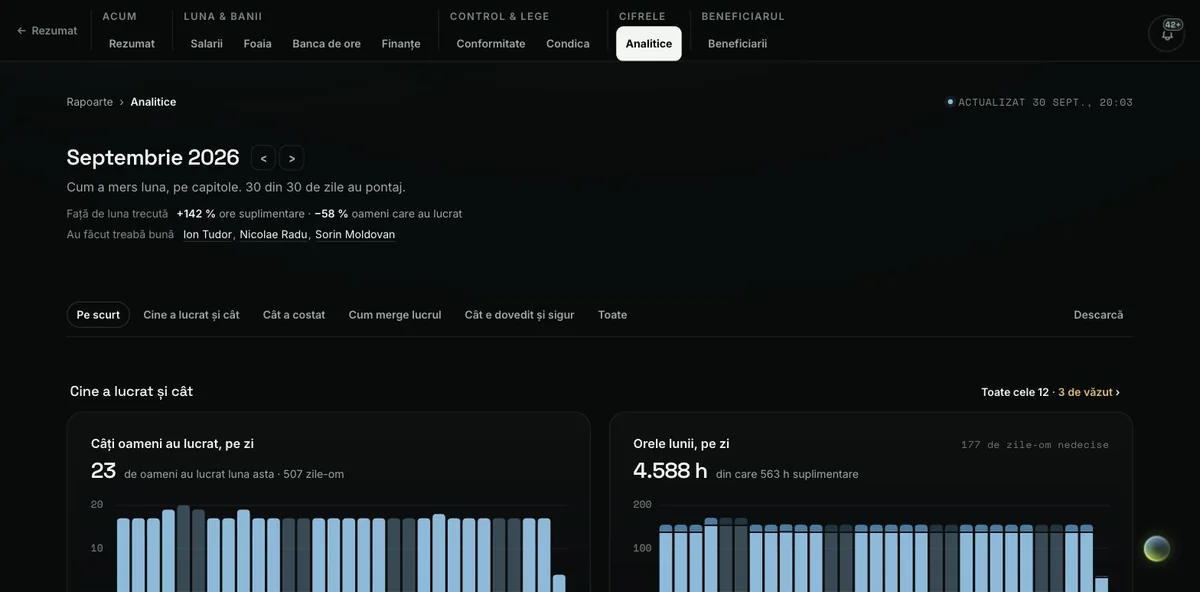
2The month in figureshappens by itselfPeople, hours, money and sites, month by month, with the source of every figure.
who’s late, by the minute, person by person
who corrected hours, and why
materials and safety, for the same month
In the plan Operations
3Your people’s contractsYou know in time when someone’s contract runs out.
each person’s contract, with hours and pay
an alert before it expires
tells you what’s missing for payroll
In the plan Operations · Employment contract
4Each person’s fileWhen you hire, when someone leaves, at an inspection: everything about one person, in one place.
their hours and pay
their leave
papers and trainings
their data, on their request
In the plan Start
5Team chat and announcementsAn announcement reaches the whole team and you see who read it.
announcements with read receipts
a group for each team
the worker answers you with a photo or a voice message too
In the plan Start
6The worker’s appThe worker sees their hours, asks for leave and disputes a day, from the phone.
“In pilot” means we start it with you, in turn, at the companies that want it. “Partial” means the core already works; the rest comes step by step.
04
Timesheets don’t get done on Sunday night. They fill themselves in, every day.
Three moments from your day, before and after.
Before
You spend all day answering the phone.
With Control 360 · Today’s map
You know who’s where without calling.
After
Today you watch him play.
Before
Everything in the company goes through you.
With Control 360 · The day’s replay
Watch the day from home, too: who came in, who left.
After
Dad actually came.
Before
00:40. You can’t sleep.
With Control 360 · The month’s analytics
The month, broken down. In numbers, not “I think”.
After
Nights are for sleeping.
You’re not buying software. You’re buying your evenings back.
And the worker? His phone clocks him in by itself.*
“We clock you in when you get to work.” That’s what his phone says.
* He walks onto the site: clocked in. He leaves: clocked out. On the phones we set up for you; where that isn’t possible, the worker taps a button or the site manager enters him.
These are screenshots from the app, from a demo company, with the interface in Romanian.
05
Good people stand out. Facts, not impressions.
Without proof, every payday is a negotiation.
Pay gets calculated. Not haggled over.
Some arrive at 7. Some say they arrive at 7.
“I got here at 7” is no longer just talk. It’s on record.
Workers don’t want to be watched.
They just don’t want to be short-changed.
The foreman is no longer a secretary.
He’s a foreman again.
People who work want witnesses.
06
The right start for your company, written down before you pay.
We start remotely, with assisted configuration and video training. You pick the job and send the team list; we agree the date together in writing.
StartRemote configuration and testing. Target: activation within 2 business days after the complete list, under the written schedule.
Operations · BusinessRemote start on the date agreed in writing. Video training and the pilot report on day 14.
Your acceptanceThe subscription begins after you accept activation or the pilot. Criteria and remedy are written before payment.
I don’t have time for another program.
Every new program cost you another month.
You pick the job. We do the rest.
Assisted remote configuration. We show you how to use it by video.
My people don’t want apps.
Software nobody uses is money thrown away.
People don’t want apps. They want every hour counted.
If she says no, you still do the month yourself, on Sunday.
Your accountant doesn’t get another password. She gets the month.
One month side by side with her sheet. She picks which one stays.
I’ve paid for software before. It didn’t work.
The advance was gone. The software stayed in the box.
We write the criteria down before you pay.
Not working? We fix it at our cost. Still not working? Money back.
I don’t want to be tied in for a year.
Long contracts outlive the software.
Monthly. 30 days’ notice. No lock-in.
No subscription invoice without your “yes”.
The guarantee
No result,no cost.
If we don’t deliver what we put in writing, the set-up is on us, out of our own pocket: you get your whole advance back.
Proof, or your money back.
We fix it at our cost.
The result means three criteria, written for your company before you pay.
The price is in plain sight. The same for everyone.
Start
The hours, with proof.
29RON a person, a month
Clock-in from the phone, on every site
The daily attendance register, ready for the labour inspectorate (ITM)
The month, in your accountant’s file
People
Monthly
Advance, deducted from the first invoices
10
290 RON
500 RON
20
580 RON
500 RON
30
870 RON
500 RON
Operationsrecommended
Everything in Start, plus the work.
49RON a person, a month
Tasks per crew, with a deadline and a check
Materials: who took them, where they went
Tools and machines: who has them
People
Monthly
Advance, deducted from the first invoices
10
490 RON
1,500 RON
20
980 RON
1,500 RON
30
1,470 RON
1,500 RON
Business
Everything in Operations, plus the job’s money.
89RON a person, a month
Estimates and monthly valuations
Suppliers’ invoices, bank statement, expense claims
Cost and margin per job · partial
e-Factura invoices, the client’s page · in pilot
People
Monthly
Advance, deducted from the first invoices
10
890 RON
1,500 RON
20
1,780 RON
1,780 RON
30
2,670 RON
2,670 RON
RON, excluding VAT (21%). The firm licence includes 10 places.
The terms in full: the criteria, the money, what we do
Example criteria
We write yours together, before you pay.
Everyone scheduled appears in the report, with full hours or an explained absence.
Every exception has a cause, a person responsible and an outcome.
The person you choose, usually your accountant, downloads the pilot’s export as PDF or CSV and confirms the people, the hours and the exceptions.
Your side is written down up front too: the chosen job, the list of people, the phones. If a phone passed our test and still doesn’t clock in, that’s on us.
What happens to your money
If you carry on
The advance is deducted from the first invoices. You don’t pay for set-up twice.
If we don’t deliver our part
We have 5 working days to fix it, at our cost. If it still doesn’t work, we give back your whole advance, within 5 working days.
If it works and you stop anyway
The advance pays for the set-up we did. The report and the data are yours.
If it stalls at your end
We keep only the phases already done, as the contract sets out. You get the rest back.
What we do during set-up
We set up the phones ourselves. Assisted remote configuration and video training, for every plan.
We test the phones before we start. We tell you which ones it works on and which it doesn’t.
We check the first export with your accountant. PDF or CSV: the people, the hours and the exceptions.
The privacy notice for your people, already written. You sign it.
The list of people: send it messy, get it back tidy. We put it in order.
The pilot report on day 14. Operations and Business. Start uses remote activation checks.
One person on the phone for the whole set-up. Not a call centre.
The promises
No subscription invoice without your “yes”. The subscription only starts when you accept the pilot, in writing.
Monthly, no commitment. 30 days’ notice. Annual only if you choose it.
Your accountant has the last word. One month side by side with her sheet. She picks which one stays.
The hours and the register are yours. Download them any time: Excel, CSV or PDF.
The same price for everyone. The one on this page.
Set-up (the advance) is paid once, before day 1: on Start, 500 RON; on Operations and Business, one month’s subscription for everyone on it, minimum 1,500 RON, maximum 4,500 RON. We agree the start day together once we have the complete list; Start is set up remotely, within 2 working days. We start and verify at most 8 new companies a month remotely on Operations and Business. First month with a free place: this month. Annual only if you want it: 12 months for the price of 10, paid up front.
Do my people have to take photos to be clocked in?
No. Clocking in needs no photo. A photo is only for finished work, if you ask for one.
My workers don’t use apps.
People don’t want apps. They want every hour counted. If someone refuses, the site manager enters him. The day isn’t lost.
My people’s phones are old and have no signal.
There’s no signal in a basement. The hours are still saved and are sent as soon as the phone gets a signal. We don’t promise it works on every phone. We promise to tell you which ones it works on: we test the phones before we start. The workers’ app runs on Android; there is no iPhone version yet.
My accountant doesn’t want another system.
Your accountant doesn’t get another password. She gets the month in a file: PDF or CSV. One month side by side with her sheet. She decides when to drop hers.
What happens to my team’s data?
The phone’s location and the time, so we know when someone enters and leaves the site, plus what they write or photograph. Other data, such as the phone’s movement or which floor they’re on, only if you choose it in the contract. Each worker sees his own hours, the foreman sees his crew, you see the company. How long we keep each piece of data is set out in the retention schedule in the contract; we give you the privacy notice for your people already written.
If I leave, do I keep my data?
Yes. You download the timesheet, the register and the accountant’s package yourself, any time: Excel, CSV or PDF.
It’s too expensive.
Expensive compared to what? At 45 RON an hour, one lost hour a day for a single worker is 945 RON a month. His subscription: 29, 49 or 89 RON. Put your own numbers into the calculator above.
Evenings belong to the family.
Pick one job. We do the rest.
Leave your number and we’ll call you: to answer your questions and, if you want, pick the job together.
No result, no cost.
If we don’t deliver what we put in writing, the set-up is on us, out of our own pocket: you get your whole advance back.
The photos are generated illustrations; the people in them are not clients. The screens in chapters 03 and 04 are screenshots from the app, from a demo company.